Why Does My Drone Camera Shake?
Image source: Bing (Web (fair-use with source credit))
When you're trying to capture breathtaking aerial views, the last thing you want is shaky, wobbly footage. If you've ever asked yourself, "Why does my drone camera shake?", you're not alone. It's a frustrating issue that can turn a great flight into disappointing video.
Fortunately, most causes of camera shake are fixable with a bit of troubleshooting. Manufacturer specifications often detail gimbal performance standards, like maintaining stability within a specific degree of tilt even under moderate turbulence. We'll walk through the most common culprits, starting with the equipment itself.
Quick Answer
Drone camera shake usually stems from a dirty or uncalibrated gimbal, unbalanced or damaged propellers, or excessive vibrations from the drone's motors. Environmental factors like strong winds can also contribute significantly to unsteady footage. Checking these core components is the first step to smoother drone video.
Gimbal Health Check: Is Your Stabilizer the Culprit?
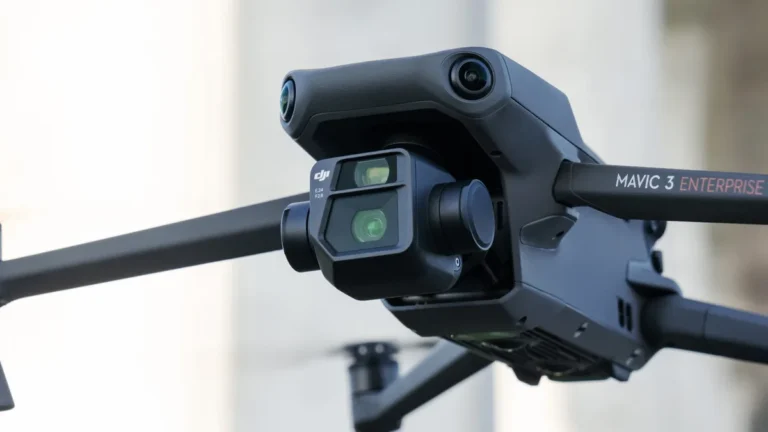
The gimbal is your drone's unsung hero, working tirelessly to keep the camera steady. If your footage is shaking, it's a smart first step to investigate this crucial component. Think of it as the shock absorber for your camera.
Gimbal Obstructions and Cleaning
Sometimes, the simplest things cause the biggest problems. Dust, debris, or even a stray piece of grass can get lodged around the gimbal's delicate mechanisms. When this happens, the gimbal might struggle to move freely, leading to jerky movements that show up in your video.
- What to Look For: Visually inspect the gimbal arms, motors, and the connection points to the drone body. Gently try to rotate the gimbal by hand (when the drone is powered off, of course) to feel for any stiffness or catching.
- How to Clean: A soft, dry microfiber cloth is your best friend here. Gently wipe away any visible dust or debris. For harder-to-reach spots, a can of compressed air can be useful, but use it in short bursts and keep the can upright to avoid expelling propellant. Avoid using any liquids, as they can damage the electronics.
Gimbal Calibration: Getting it Right
Even with a perfectly clean gimbal, it needs to know its proper orientation. This is where calibration comes in. A miscalibrated gimbal can overcompensate for perceived movements, causing shakes.
- When to Calibrate: Manufacturers often recommend recalibrating the gimbal if the drone has experienced a significant impact, been transported roughly, or if you notice persistent instability.
- The Process: Most drone apps provide a calibration function. Generally, you'll need to place your drone on a perfectly level surface. Follow the on-screen prompts in the app precisely. This usually involves letting the drone's sensors orient themselves for a minute or two. Accuracy is key; an uneven surface will lead to a flawed calibration.
Camera Mount Security
It sounds basic, but you'd be surprised how often a slightly loose camera can cause issues. If the camera unit itself isn't snug in its mount, the vibrations from the drone's motors and flight can transfer directly to the camera sensor.
- Double-Check Connections: If your camera is detachable, ensure it's clicked in firmly. Some drones have a small locking mechanism; make sure it’s engaged.
- Look for Play: Gently try to wiggle the camera while the drone is off. Is there any noticeable movement? If so, investigate how the camera is secured and tighten any accessible screws or clips. A secure mount ensures that the gimbal can do its job effectively.
Vibration Check: Are Propellers or Motors Causing the Wobble?
If your gimbal seems to be in good working order, the next most common source of vibration is the propulsion system itself. Propellers and motors are the workhorses of your drone, and if they're not performing optimally, everything else can be affected.
Inspecting and Replacing Propellers
Propellers spin at incredibly high speeds, thousands of revolutions per minute. Even a tiny imperfection can create significant vibrations. Think of a washing machine with an unbalanced load; it's going to shake!
- Visual Inspection: Look closely at each propeller. Any nicks, cracks, or bends? Even a small chip on the edge can throw off its balance. Damage can happen from minor crashes or even just bumping into things.
- Balance: Propellers need to be balanced to spin smoothly. If one is slightly heavier or has a different aerodynamic profile due to minor damage, it will cause vibrations. While professional balancing tools exist, the most practical solution for hobbyists is often to replace any propeller that looks suspect.
- Mounting: Ensure all propellers are securely attached to their respective motor shafts. Check that you're using the correct propellers for your specific drone model, as they are often directional.
Understanding Motor Vibrations
Drone motors are designed to spin smoothly and efficiently. However, if a motor is damaged internally, has debris interfering with its bearings, or is experiencing an electrical issue, it can generate unwanted vibrations.
- Listen Closely: During a pre-flight check (with the drone powered on but on the ground), listen to each motor. Do you hear any grinding, rattling, or uneven whirring sounds? A consistent, smooth hum is what you're looking for.
- Feel for Heat: After a short test flight, carefully feel the motor casings. Are any excessively hot compared to the others? This could indicate strain due to an internal issue or an imbalance.
- Obstructions: Sometimes, small pieces of debris can get into the motor housing. If you suspect this, you might be able to gently clean it out with compressed air. However, motor issues can be complex and may require professional attention or replacement if the vibration persists after checking propellers.
Environmental Factors Affecting Footage Stability
Sometimes, the shaking isn't a malfunction of the drone itself, but a reaction to its surroundings. Understanding how external forces impact your drone's stability is key to getting smooth shots.
Dealing with Wind
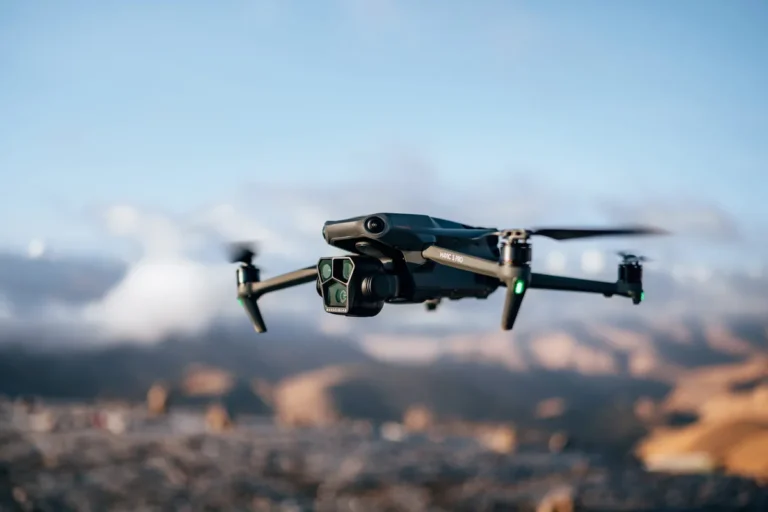
Wind is the most frequent environmental factor that causes shaky drone footage. Even a light breeze can push the drone around, forcing the gimbal to work harder to compensate. Gusty winds are particularly challenging.
- Moderate Winds: In mild wind conditions, the gimbal can usually keep up, but you might notice slight jitters or drifts in your footage. Keeping your drone's position locked via GPS is crucial here.
- Strong or Gusty Winds: When winds become strong, the gimbal may struggle to counteract the forces. This can result in noticeable camera movements, even if the drone's overall flight path remains relatively stable. For the smoothest footage, it's best to fly in calm conditions or use a drone with advanced wind resistance capabilities.
- Flying Strategy: When flying in windy conditions, try to fly with the wind rather than directly against it when possible. Also, avoid aggressive, sudden movements of the control sticks, as this can exacerbate the effect of the wind on the camera.
Flight Mode Impact
Drones often offer various flight modes designed for different purposes, and these can directly influence how stable your camera footage appears. The mode you choose can either help or hinder your quest for smooth video.
- Cinematic/Tripod Mode: This mode is specifically designed to reduce the drone's speed and sensitivity to control inputs. It smooths out movements, making it ideal for capturing professional-looking, stable footage. The gimbal’s response is often dampened, helping to filter out minor shakes.
- Normal/GPS Mode: This is a balanced mode suitable for general flying. It provides decent stability and responsiveness, but might not be as smooth as dedicated cinematic modes, especially when there's slight turbulence.
- Sport/ATV Mode: This mode prioritizes speed and agility. Control inputs are much more sensitive, and the drone can move rapidly. While exciting for flying, this mode typically results in much shakier camera footage because the gimbal is constantly trying to keep up with the drone's rapid movements. For stable video, avoid Sport mode.
Software and Firmware: The Unseen Influences
Just like any complex piece of technology, your drone relies on software and firmware to operate correctly. Issues in these areas, though less common than physical problems, can definitely manifest as camera shake.
- Firmware Updates: Manufacturers regularly release firmware updates for their drones and gimbals. These updates often contain bug fixes and performance improvements that can directly address stability issues. Always ensure your drone, controller, and gimbal firmware are up-to-date by checking the official manufacturer's app or website.
- App Glitches: Sometimes, the companion app you use to control your drone might have a temporary glitch affecting gimbal commands. Restarting the app, or even your smartphone or tablet, can sometimes resolve minor software conflicts that might be contributing to camera instability.
- Configuration Settings: Beyond basic calibration, some drone apps offer advanced gimbal settings. These might include responsiveness, dead zones, or stabilization strength. Incorrectly configured advanced settings could potentially lead to unwanted camera movements. Review these settings in your app, comparing them to default or recommended values if you’ve made manual adjustments.
When to Seek Expert Help
If you've gone through the common troubleshooting steps, checking the gimbal, cleaning, calibrating, inspecting propellers, and ensuring firmware is up-to-date, and your drone camera is still shaking, it's likely time to consult a professional. Persistent, unresolvable shake can indicate a more serious internal issue.
- Signs of Deeper Problems: Listen for unusual noises from the motors or gimbal that aren't related to normal operation. Visible damage to the drone's frame or gimbal structure after a crash also warrants professional inspection. If the drone behaves erratically in flight beyond just camera shake, it's a concern.
- Manufacturer Support: Your first port of call should be the drone manufacturer's official support channels. They have specific knowledge of their models and can guide you through advanced diagnostics or arrange for repairs. Many manufacturers offer warranty services that can cover manufacturing defects or accidental damage, depending on your coverage.
- Authorized Repair Centers: For out-of-warranty repairs or more complex issues, seek out authorized drone repair centers. These technicians have the specialized tools and expertise to diagnose and fix problems that are beyond the scope of DIY troubleshooting. Using unauthorized repair services could void any remaining warranty and may result in less-than-optimal repairs.
How to Maintain Your Drone for Optimal Camera Stability
Regular maintenance is key to preventing many common drone issues, including camera shake. By keeping your drone in top condition, you ensure the gimbal and other critical components function as designed. This proactive approach saves you time and frustration down the line.
- Cleaning Schedule: Establish a routine for cleaning your drone. After every few flights, or after flying in dusty or damp conditions, give your drone a gentle wipe-down. Pay special attention to the gimbal area and propeller mounts.
- Propeller Care: Treat your propellers with care. Store them in a way that prevents damage, like a dedicated propeller guard or case. Replace them immediately if you notice any nicks, cracks, or bends, even minor ones. This simple step can prevent a host of vibration problems.
- Battery Health: While not directly related to camera shake, maintaining healthy batteries ensures consistent power delivery, which can indirectly affect overall drone stability and performance.
Common Drone Camera Shake Mistakes to Avoid
When troubleshooting, it's easy to make small errors that either don't solve the problem or, worse, create new ones. Being aware of common pitfalls can help you avoid them.
- Over-Tightening Screws: While ensuring components are secure is important, over-tightening screws on motor mounts or propeller adapters can strip threads or damage the motor housing. This can lead to new vibrations or even motor failure. Always tighten screws until snug, then give a quarter-turn more if needed, but avoid excessive force.
- Ignoring Propeller Direction: Drones have specific propellers that rotate clockwise and counter-clockwise to generate lift and stability. Installing them incorrectly can lead to flight instability and excessive vibration, potentially causing the camera to shake. Always double-check the markings on your propellers and match them to the correct motor.
- Using Incorrect Cleaning Agents: Never use harsh chemicals or abrasive cleaners on your drone. These can damage plastic parts, lenses, and electronic components. Stick to recommended cleaning tools like microfiber cloths and compressed air.
Drone Camera Shake: Real-World Scenarios
Let's look at a couple of common scenarios where camera shake becomes a problem and how it's typically resolved. These examples illustrate how different issues manifest and what the resolution looks like.
- Scenario 1: The New Drone Jitters. A user gets a new drone and notices a slight tremor in their footage right out of the box. After inspecting the propellers and finding them perfect, they notice the gimbal calibration option in the app. A quick calibration on a level surface resolves the issue, indicating the gimbal was slightly off its factory setting.
- Scenario 2: The Post-Crash Wobble. A pilot has a minor landing incident, bumping a propeller. After the incident, their footage develops a noticeable wobble. A visual inspection reveals a tiny bend in one propeller. Replacing that single propeller immediately stops the camera shake, demonstrating the sensitivity of the drone's balance to propeller integrity.
Understanding Gimbal Modes and Settings
Many modern drones offer adjustable gimbal settings that can fine-tune stabilization. Understanding these can help you optimize your footage.
- Stabilization Strength: Some apps allow you to adjust the overall strength of the gimbal's stabilization. If it's set too high, it can sometimes introduce artificial-looking movements or oscillations, especially in certain conditions. Conversely, too low a setting won't counteract vibrations effectively.
- Dampening: This setting controls how quickly the gimbal reacts to movements. Higher dampening results in smoother, slower responses, ideal for cinematic shots. Lower dampening makes the gimbal more responsive, which might be useful in highly dynamic flight but can also amplify minor vibrations if not managed carefully.
- Manual Control: While most users rely on automatic gimbal functions, advanced pilots might adjust settings like tilt speed or follow speed. Improperly set manual controls can inadvertently cause jerky movements or a lack of stability.
When to Consider a Drone Upgrade for Stability
If you've tried all the troubleshooting steps and consistently experience camera shake, it might be time to consider if your current drone model is the limitation. Newer or higher-end drones often incorporate more advanced stabilization technology.
- Advanced Gimbal Systems: Higher-tier drones often feature 3-axis gimbals with more powerful motors and more sophisticated sensors. These systems can more effectively counteract vibrations and wind, providing inherently smoother footage.
- Integrated Stabilization: Some drones also incorporate electronic image stabilization (EIS) in addition to mechanical gimbal stabilization. This dual approach can offer superior stability, especially in challenging conditions.
- Durability and Design: Newer drone designs might also have better vibration-dampening materials or structures, reducing the amount of vibration that reaches the gimbal and camera in the first place. If stability is paramount for your aerial photography or videography, investing in a drone designed with advanced stabilization in mind can make a significant difference.
Frequently Asked Questions
Why is my drone's camera shaking only in certain directions?
This often points to an issue with a specific axis of the gimbal. For example, if the shake is primarily side-to-side (roll), it might be a problem with the roll motor or its calibration. If it's up and down (tilt), the tilt motor could be the culprit.
Can extreme temperatures affect my drone's camera stability?
Yes, extreme cold or heat can impact the performance of batteries and electronics, including the gimbal motors and sensors. Cold can make lubricants in the gimbal motors sluggish, while heat can cause components to expand. It's best to operate drones within their specified temperature ranges, typically found in the manufacturer's documentation.
I crashed my drone, and now the camera shakes. What should I do?
After a crash, a thorough inspection is crucial. Check the gimbal for any physical damage, debris, or stiffness. Re-calibrate the gimbal and check your propellers for damage or imbalance.
If the shaking persists, it likely indicates internal damage to the gimbal or frame, and professional repair is recommended.
Why is my drone's footage shaky even when it's not windy?
This usually means the issue is with the drone itself. The most common culprits are an unbalanced or damaged propeller, a dirty or uncalibrated gimbal, or vibrations originating from the motors. Work through the troubleshooting steps outlined in the earlier sections to diagnose the specific problem.
How often should I calibrate my drone's gimbal?
Gimbal calibration is most critical after a crash or if you notice persistent shaking. However, performing a calibration every few months, or whenever you transport the drone in a way that might jostle it, is a good practice to maintain optimal performance and stability. Always calibrate on a flat, level surface.