Why Does Drone Footage Have Rolling Shutter?
Image source: Bing (Web (fair-use with source credit))
You've probably seen it. You're flying your drone, capturing some awesome shots, and then you review the footage. Sometimes, especially when the drone is moving or there's vibration, you notice a weird, jello-like wobble or distortion in the video.
It’s not that your drone is broken, and it's not usually that your camera is faulty. More often than not, what you're seeing is a direct result of something called rolling shutter.
It sounds a bit technical, I know, but stick with me. It's actually a pretty neat concept that explains a lot about how digital cameras capture images, especially in situations where things are moving fast, which, let's be honest, is pretty much the norm for drone flying. As of 2026, this phenomenon continues to be a common consideration for aerial cinematographers.
Quick Answer
Drone footage has rolling shutter because most cameras capture images line by line, not all at once. As the drone moves or vibrates, the top of the image is captured at a slightly different time than the bottom. This difference causes visible distortions like wobbles and skew in the final video.
How Cameras Capture Images: The Rolling Shutter Scan
Most digital cameras, including the ones on your drone, don't capture an entire image all at once, like a snapshot from an old film camera. Instead, they tend to capture the image line by line. Think of it like a scanner moving down a page, but happening incredibly fast.
This method is called rolling shutter. The sensor reads the image information from the top of the frame all the way down to the bottom. While this is super efficient and works great for still photos or slow-moving scenes, it can cause some quirky effects when there's rapid motion or vibration.
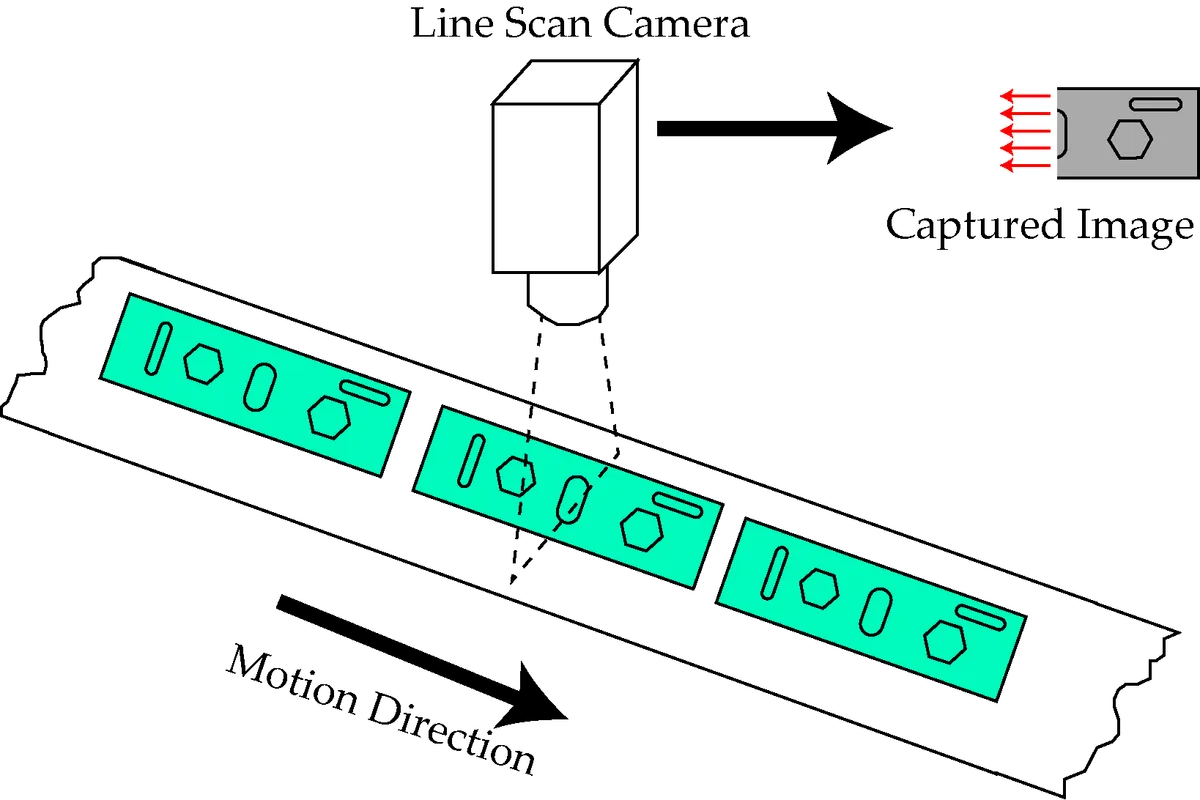
Image source: Bing (Web (fair-use with source credit))
Per common manufacturer specifications, this scanning process often takes milliseconds, but when the subject or camera is moving significantly within that timeframe, the resulting discrepancies become noticeable. This is fundamentally different from a global shutter, which captures the entire frame simultaneously.
The "Jello" Effect: What Rolling Shutter Actually Does to Your Video
So, why the "rolling" effect and the common "jello" look? Imagine your drone is moving forward quickly. The camera starts capturing the top of the frame.
By the time it gets to the bottom of the frame, the drone (and everything in the scene) has moved a little bit.
This tiny difference in position between the top and bottom of the image gets recorded. When you play the video back, your brain interprets this as a distortion or wobble. It’s similar to if you tried to take a photo of a spinning fan with a very fast shutter speed; the blades might look warped or bent.
With rolling shutter, it's the speed of the scan relative to the speed of the movement that causes the issue.
This manifests in several ways:
- Wobble or Jello Effect: Straight lines, like the horizon or buildings, can appear to bend or shake.
- Skew: If the drone is moving rapidly horizontally, vertical lines can lean.
- Partial Exposure: Less common, but in very extreme cases with fast-moving subjects, you might see parts of the image that look "cut off" or strangely exposed because the scene changed too much during the scan.
Identifying Rolling Shutter Artifacts: What to Look For
You'll typically see a few common visual artifacts that signal rolling shutter is at play. The most prevalent is the wobble or jello effect. This is where normally straight lines, such as the horizon, buildings, or even the edges of the drone's frame if it’s in shot, appear to bend, curve, or shake.
Another telltale sign is skew. If your drone is performing a rapid horizontal movement, like a fast pan or a sideways translation, vertical lines in the scene might appear to lean at an angle. This happens because the camera sensor is still capturing data as the drone moves, causing a slight offset from top to bottom.
Less frequently, you might encounter partial exposure issues. This is more extreme and usually occurs with very high-speed motion or significant vibration. In these instances, parts of the image might look oddly cut off or underexposed because the scene changed so drastically while the sensor was still scanning.
Recognizing these visual cues is the first step to addressing the problem.
Why Drones Are Prone to Rolling Shutter Problems
It's not just drones that suffer from rolling shutter; many digital cameras and smartphones use this technology for video recording. However, rolling shutter effects are often more noticeable in drone footage for a few key reasons.
Drones are inherently mobile platforms. They're designed to move, and often they move at higher speeds than a person walking or even a car. This constant motion means the scene is always changing from the perspective of the camera sensor.
Furthermore, drones introduce vibrations. The motors and propellers generate a consistent level of shake. While gimbals do an incredible job stabilizing the camera, they can't always completely counteract rapid, high-frequency vibrations that can exacerbate rolling shutter.
Aggregate reviews from drone pilots consistently highlight that smoother flight patterns and well-maintained equipment are crucial for minimizing these artifacts, as detailed in operator guides.
Minimizing Rolling Shutter: Practical Tips for Smoother Footage
While you can't eliminate rolling shutter entirely if your camera uses it, there are definitely ways to minimize its impact and work around it. The key is to reduce the difference in motion between the top and bottom of the frame during the scan.
- Fly Smoother: This is the biggest one for drones. Smoother movements mean less rapid change between the top and bottom of the frame. Practice gentle turns, inclines, and speed adjustments. Avoid abrupt starts and stops.
- Reduce Vibration: Make sure your drone is well-maintained. A loose propeller or a poorly balanced motor can add extra shake that exacerbates rolling shutter. Even minor vibrations can be amplified by the rolling shutter effect.
- Consider ND Filters: In bright sunlight, you're often forced to use a fast shutter speed to avoid overexposure. Using Neutral Density (ND) filters allows you to slow down your shutter speed, which can sometimes make the rolling shutter effect less apparent by capturing more of the scene at a similar point in time.
- Fly at Different Angles: Sometimes, flying at an angle that avoids a strong horizontal or vertical line as the primary subject can help mask the rolling shutter effect. Experiment with different camera tilts and flight paths.
If your drone camera has adjustable frame rates and shutter speeds, ensure they are set appropriately for the lighting conditions and desired motion blur. Manufacturer specifications often provide guidance on optimal settings for different shooting scenarios.
Global Shutter: The Alternative to Rolling Shutter
This is the "dream solution" but it's not always an option for every drone. Some higher-end cameras and specialized drones use a global shutter. This type of shutter does capture the entire image at once, eliminating rolling shutter effects altogether.
When a global shutter is active, every pixel on the sensor is exposed and read out at precisely the same moment.
This simultaneous capture means that any motion or vibration that occurs during the exposure is recorded uniformly across the entire frame. As a result, you won't see the characteristic warping, skewing, or jello-like artifacts associated with rolling shutter. This makes global shutter ideal for fast-moving subjects or when the camera itself is subject to significant vibration or quick movements.
However, cameras with global shutters are often more expensive and might not be found on entry-level or even mid-range consumer drones. They can also sometimes have limitations in dynamic range or resolution compared to their rolling shutter counterparts. For applications where image integrity during high-speed action is paramount, like industrial inspection or professional sports videography, the investment in a global shutter camera is often justified.
Per technical documentation from leading camera sensor manufacturers, global shutter technology is continuously improving, aiming to narrow the gap in other performance areas.
Frequently Asked Questions About Drone Rolling Shutter
What's the difference between rolling shutter and global shutter?
Rolling shutter captures images line by line, leading to potential distortions with fast motion. Global shutter captures the entire image simultaneously, preventing these motion artifacts.
Can I fix rolling shutter in post-production?
Yes, video editing software has tools to correct rolling shutter, but results vary. It's always best to minimize the effect during capture through smoother flying and proper camera settings.
Is rolling shutter bad for my footage?
It's not inherently "bad," but it can be undesirable for professional or aesthetically pleasing shots. It's a technical characteristic that becomes a problem when motion or vibration is significant.
Will all drone footage have rolling shutter?
No, only footage from cameras that employ rolling shutter technology will exhibit this. Higher-end drones or specialized aerial cameras may feature global shutters, which avoid these issues.
How do I know if my drone has a rolling shutter?
Check your drone's specifications or camera manual. Most consumer drones use rolling shutter sensors for video recording to balance cost and performance.